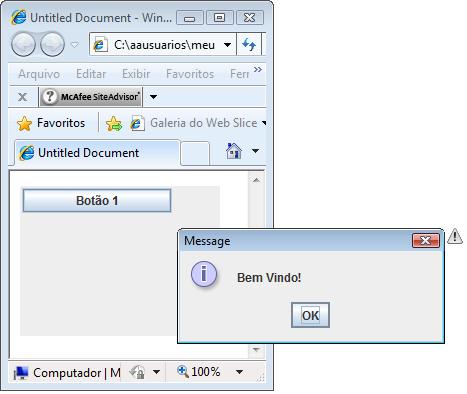
| Arquivo: teste.html |
| <html> <head> <title>Untitled Document</title> </head> <body> <APPLET CODE="JavaApplet.class" WIDTH="200" HEIGHT="150"> </APPLET> </body> </html> |
| Arquivo: JavaApplet.java |
import javax.swing.*; import java.awt.*; import java.awt.event.*; public class JavaApplet extends JApplet { private JButton botao_1; public void init() { Container ct = this.getContentPane(); ct.setLayout(null); botao_1 = new JButton("Botão 1"); botao_1.setBounds(2,2,150,25); ct.add(botao_1); botao_1.addActionListener(new ActionListener() { public void actionPerformed(ActionEvent e) { JOptionPane.showMessageDialog(null, "Bem Vindo!"); }}); } } |
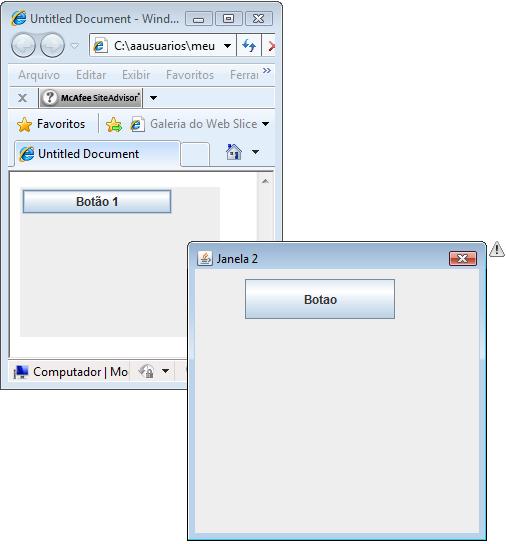
| Arquivo: teste.html |
| <html> <head> <title>Untitled Document</title> </head> <body> <APPLET CODE="JavaApplet.class" WIDTH="200" HEIGHT="150"> </APPLET> </body> </html> |
| Arquivo: JavaApplet.java |
import javax.swing.*;
import java.awt.*;
import java.awt.event.*;

public class JavaApplet extends JApplet {

   private JButton botao_1;
   private JDialog janela2;
   private JButton botao_2;

   public void init() {

      Container ca = this.getContentPane();
      ca.setLayout(null);

      botao_1 = new JButton("Botão 1");
      botao_1.setBounds(2,2,150,25);
      ca.add(botao_1);


      botao_1.addActionListener(new ActionListener() {
         public void actionPerformed(ActionEvent e) {

            janela2();

      }});
   }

     public void janela2(){
      janela2 = new JDialog();

      janela2.setTitle("Janela 2");
      janela2.setSize(300,300);
      janela2.setLocation(20, 400);

      Container ct2 = janela2.getContentPane();
      ct2.setLayout(null);

	  botao_2 = new JButton("Botao");
      botao_2.setBounds(50, 10, 150, 40);
      ct2.add(botao_2);


      botao_2.addActionListener(new ActionListener() {
         public void actionPerformed(ActionEvent e) {

			  if(botao_1.getText().equals("2ª Janela")){
                   botao_1.setText("Janela 2");
			  } else {
                   botao_1.setText("2ª Janela");
			  }
              janela2.dispose();

      }});

      janela2.setModal(true);
      janela2.setVisible(true);
  }
} |
<APPLET CODE="JavaApplet.class" WIDTH="45" HEIGHT="230">
<PARAM NAME="primeiro_arg" VALUE="teste">
<PARAM NAME="segundo" VALUE="100">
</APPLET>
String s1 = getParameter("primeiro_arg"); // s1 é a String "teste".
String s2 = getParameter("segundo"); // s2 contém a String 100
int second_value = Integer.parseInt(s2); // Transforma s2 em um número
Se o seu programa chamar o método getParemeter com o nome de um parâmetro Html que não exista getParameter retornará o valor null. Em um applet, seu programa pederá testar o valor null:
String param = getParameter("algum_parametro");
if(param==null)
param = "Valor padrão";
| Arquivo: teste.html |
| <html> <head> <title>Untitled Document</title> </head> <body> <APPLET CODE="JavaApplet.class" WIDTH="200" HEIGHT="150"> </APPLET> </body> </html> |
| Arquivo: JavaApplet.java |
import javax.swing.*;
import java.awt.*;
import java.awt.event.*;

import java.applet.*;
import java.net.*;

public class JavaApplet extends JApplet {

   private JButton botao_1;

   public void init() {

      Container ct = this.getContentPane();
      ct.setLayout(null);

      botao_1 = new JButton("Botão 1");
      botao_1.setBounds(2,2,150,25);
      ct.add(botao_1);


      botao_1.addActionListener(new ActionListener() {
         public void actionPerformed(ActionEvent e) {

AppletContext context = getAppletContext();
String variavel = "http://localhost/java/variavel.php?variavel1=Teste1&variavel2=Teste2&variavel3=Teste3";
try {
    URL u = new URL(variavel); // Cria objeto URL aciona o browser
    context.showDocument(u, "_self");
} catch (MalformedURLException exp) {
JOptionPane.showMessageDialog(null, "URL inválida");
}

      }});
   }

} |
| Arquivo: variavel.php |
<html> $variavel2 = $_GET['variavel2']; $variavel3 = $_GET['variavel3']; |
Em junho de 1999, foi publicada a especificação do protocolo HTTP, uma especificação muito completa mas sem uma definição exata a respeito do tamanho máximo que pode ter uma URL, devido a isso, os diferentes Browsers interpretam de uma maneira diferente, e cada um possui um tamanho máximo de URL:
Mas não são só os Browsers que utilizam as URL’s, os servidores web também as administram e cada um interpreta a sua maneira:
Então, fica a dica, não utilizar URL’s com mais de 2.000 caracteres para que funcione em todos os browsers.
Exemplo:
| http://www.meusite890.com.br/.php?variavel90=6789 123456789 123456789 123456789 123456789 123456789 123456789 123456789 123456789 123456789 123456789 123456789 123456789 123456789 123456789 123456789 123456789 123456789 123456789 123456789 123456789 123456789 123456789 123456789 123456789 123456789 123456789 123456789 123456789 123456789 123456789 123456789 123456789 123456789 123456789 123456789 123456789 123456789 123456789 123456789 123456789 123456789 123456789 123456789 123456789 123456789 123456789 123456789 123456789 123456789 123456789 123456789 123456789 123456789 123456789 123456789 123456789 123456789 123456789 123456789 123456789 123456789 123456789 123456789 123456789 123456789 123456789 123456789 123456789 123456789 123456789 123456789 123456789 123456789 123456789 123456789 123456789 123456789 123456789 123456789 123456789 123456789 123456789 123456789 123456789 123456789 123456789 123456789 123456789 123456789 123456789 123456789 123456789 123456789 123456789 123456789 123456789 123456789 123456789 123456789 123456789 123456789 123456789 123456789 123456789 123456789 123456789 123456789 123456789 123456789 123456789 123456789 123456789 123456789 123456789 123456789 123456789 123456789 123456789 123456789 123456789 123456789 123456789 123456789 123456789 123456789 123456789 123456789 123456789 123456789 123456789 123456789 123456789 123456789 123456789 123456789 123456789 123456789 123456789 123456789 123456789 123456789 123456789 123456789 123456789 123456789 123456789 123456789 123456789 123456789 123456789 123456789 123456789 123456789 123456789 123456789 123456789 123456789 123456789 123456789 123456789 123456789 123456789 123456789 123456789 123456789 123456789 123456789 123456789 123456789 123456789 123456789 123456789 123456789 123456789 123456789 123456789 123456789 123456789 123456789 123456789 123456789 123456789 123456789 123456789 123456789 123456789 123456789 123456789 123456789 123456789 123456789 123456789 123456789 123456789 123456789 |
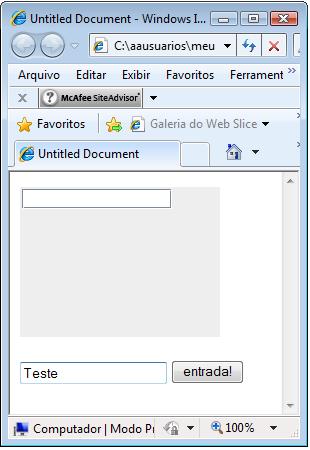
| Arquivo: teste.html |
| <html> <head> <title>Untitled Document</title> </head> <body> <APPLET CODE="JavaApplet.class" name="mens" WIDTH="200" HEIGHT="150"> <param name="codigo" value="100"> </APPLET> <script language="javascript"> function fEntrada() { app = document.mens; app.mensagem(document.form1.texto.value); } </script> <form name="form1"> <input type="text" name="texto" value=""> <input type="button" name="entrada" value="entrada!" onClick="fEntrada()"> </form> </body> </html> |
| Arquivo: JavaApplet.java |
import javax.swing.*;
import java.awt.*;
import java.awt.event.*;

public class JavaApplet extends JApplet {

   private JTextField campo1;

   public void init() {

      Container ct = this.getContentPane();
      ct.setLayout(null);


      campo1 = new JTextField("");
	  campo1.setBounds(2,2,150,20);
      ct.add(campo1);

	  // ===================
	  // Evento colocado aqui!!!!
	  // ===================

   }

public void mensagem(String texto){

      campo1.setText(texto);

}

} |
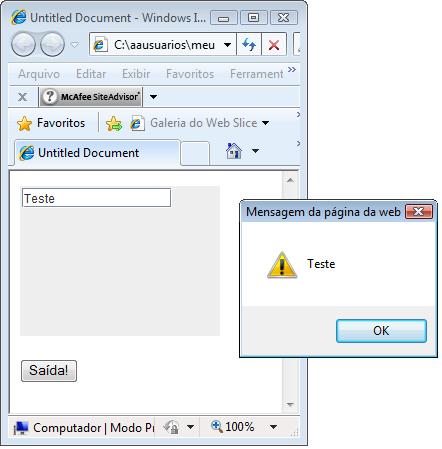
| Arquivo: teste.html |
| <html> <head> <title>Untitled Document</title> </head> <body> <APPLET CODE="JavaApplet.class" name="mens" WIDTH="200" HEIGHT="150"> <param name="codigo" value="100"> </APPLET> <script language="javascript"> function fSaida() { app = document.mens; alert(app.mensagem()); } </script> <form name="form1"> <input type="button" name="saida" value="Saída!" onClick="fSaida()"> </form> </body> </html> |
| Arquivo: JavaApplet.java |
import javax.swing.*;
import java.awt.*;
import java.awt.event.*;

public class JavaApplet extends JApplet {

   private JTextField campo1;

   public void init() {

      Container ct = this.getContentPane();
      ct.setLayout(null);


      campo1 = new JTextField("");
	  campo1.setBounds(2,2,150,20);
      ct.add(campo1);

	  // ===================
	  // Evento colocado aqui!!!!
	  // ===================

   }

public String mensagem(){

      return campo1.getText();

}

} |
| Arquivo: teste.html |
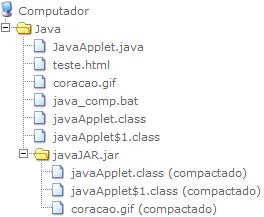
| <html> <head> <title>Untitled Document</title> </head> <body> <APPLET CODE="JavaApplet.class" archive="JavaJAR.jar" WIDTH="200" HEIGHT="150"> </APPLET> </body> </html> |
| Arquivo: JavaApplet.java |
import javax.swing.*;
import java.awt.*;
import java.awt.event.*;

public class JavaApplet extends JApplet {

   private JButton botao_1;
   private JLabel Imagem_Teste;

   public void init() {

      Container ct = this.getContentPane();
      ct.setLayout(null);

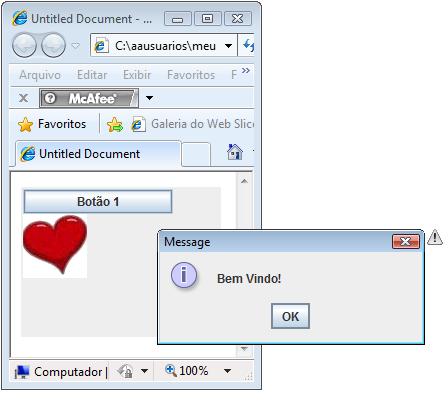
      botao_1 = new JButton("Botão 1");
      botao_1.setBounds(2,2,150,25);
      ct.add(botao_1);

	  ImageIcon img = createImageIcon("coracao.gif", "");

      Imagem_Teste = new JLabel(img);
      Imagem_Teste.setBounds(2, 27, img.getIconWidth(), img.getIconHeight());
      ct.add(Imagem_Teste);


      botao_1.addActionListener(new ActionListener() {
         public void actionPerformed(ActionEvent e) {

            JOptionPane.showMessageDialog(null, "Bem Vindo!");

      }});
   }
protected ImageIcon createImageIcon(String path,
                                           String description) {
    java.net.URL imgURL = getClass().getResource(path);
    if (imgURL != null) {
        return new ImageIcon(imgURL, description);
    } else {
        System.err.println("Couldn't find file: " + path);
        return null;
    }
}
} |
| Arquivo: java_jar.bat |
| C:\PROGRA~1\Java\JDK16~1.0_1\bin\jar cvf JavaJAR.jar JavaApplet*.class coracao.gif |